Building a Semantic Search Engine with .NET and OpenAI Embeddings
In this post, we are going to kick off a major .NET project that will eventually evolve into a fully functional, context-aware chatbot. We will break this massive task down into manageable iterations so that you understand every moving part as we go along.
In subsequent posts, you will iterate on this foundation by adding more code and features. Eventually, we will build this up into a final product: a chatbot that can access your specific data and have a contextually aware conversation with a user about that data.
Let's explore the roadmap and dive into the architecture of our first iteration.
The Project Roadmap
Before we write any code, it is important to visualize where we are going. We are going to climb a "ladder" of complexity. At each step down this ladder, you will have a fully working .NET application that you can play around with, tweak, and experiment with.
Here are the iterations we are going to go through:
- Article Search (Full Articles): We start with a basic vector search application. It indexes full Wikipedia articles and allows you to pull up the article most relevant to a semantic search query.
- Article Search (Article Chunks): We will iterate on the first step. Instead of indexing massive articles, we will pull those articles apart and index each section or "chunk" separately. I will explain why this is crucial for accuracy when we get to that part.
- RAG Pipeline: We will turn the vector search endpoint into a full RAG (Retrieval-Augmented Generation) pipeline. This system will actually answer questions rather than just returning a list of links.
- HyDE Queries: We will implement Hypothetical Document Embeddings (HyDE) to make the RAG pipeline significantly more accurate.
- Conversational AI Agent: Finally, we will wrap all of this inside an AI agent that can use tools to query the database at any point during a conversation.
This post focuses on the foundation: the first iteration where we build a semantic search engine.
Understanding Semantic Search
So, what are we actually building right now? We are building a search engine that looks something like this:
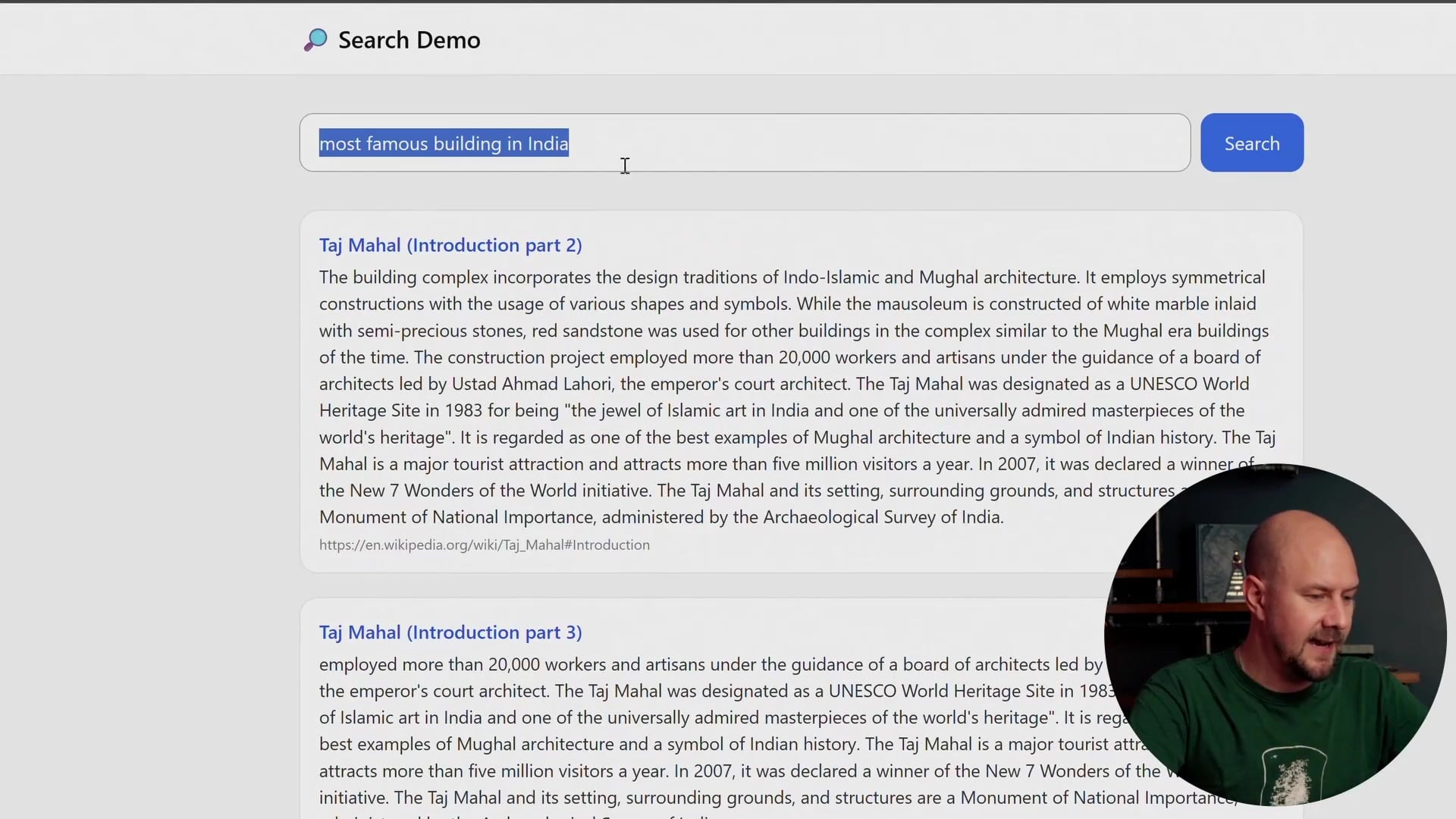
In the example above, I have typed in a very specific query: "Whats the name of that big ancient city in south america with the stone pyramids?"
If you look at the results, the system has correctly identified "Teotihuacan." This is the power of semantic search. This is not a simple keyword search. If we were doing a standard keyword search, the system might look for the exact phrase "big ancient city" or "stone pyramids" and fail if those exact words do not appear in the source text.
Instead, we have taken the meaning of the search query and performed vector matching on it. The system understands that the user is describing Teotihuacan, even if the user does not know the name of the city.
We can try other queries as well. For example, if I search for "most famous building in India," it pulls out excerpts regarding the Taj Mahal. If I search for "island with the big stone heads," it correctly retrieves information about Easter Island.
We are going to index about 20 or 30 Wikipedia pages regarding nationally important landmarks and ancient structures. We will use these to populate a vector database to power this demo.
The Application Architecture
To achieve this, we need a robust architecture. Our application is divided into two main flows: the Indexing Flow (getting data in) and the Search Flow (getting results out).
We have a front end (a basic HTML page included in the project files) and a back end. The back end is a .NET application containing an API that the front end can query. However, this same application will also contain our indexing code.
The Indexing Service
The first component we need to build is the Indexer Service. This is a piece of C# code that processes our data.
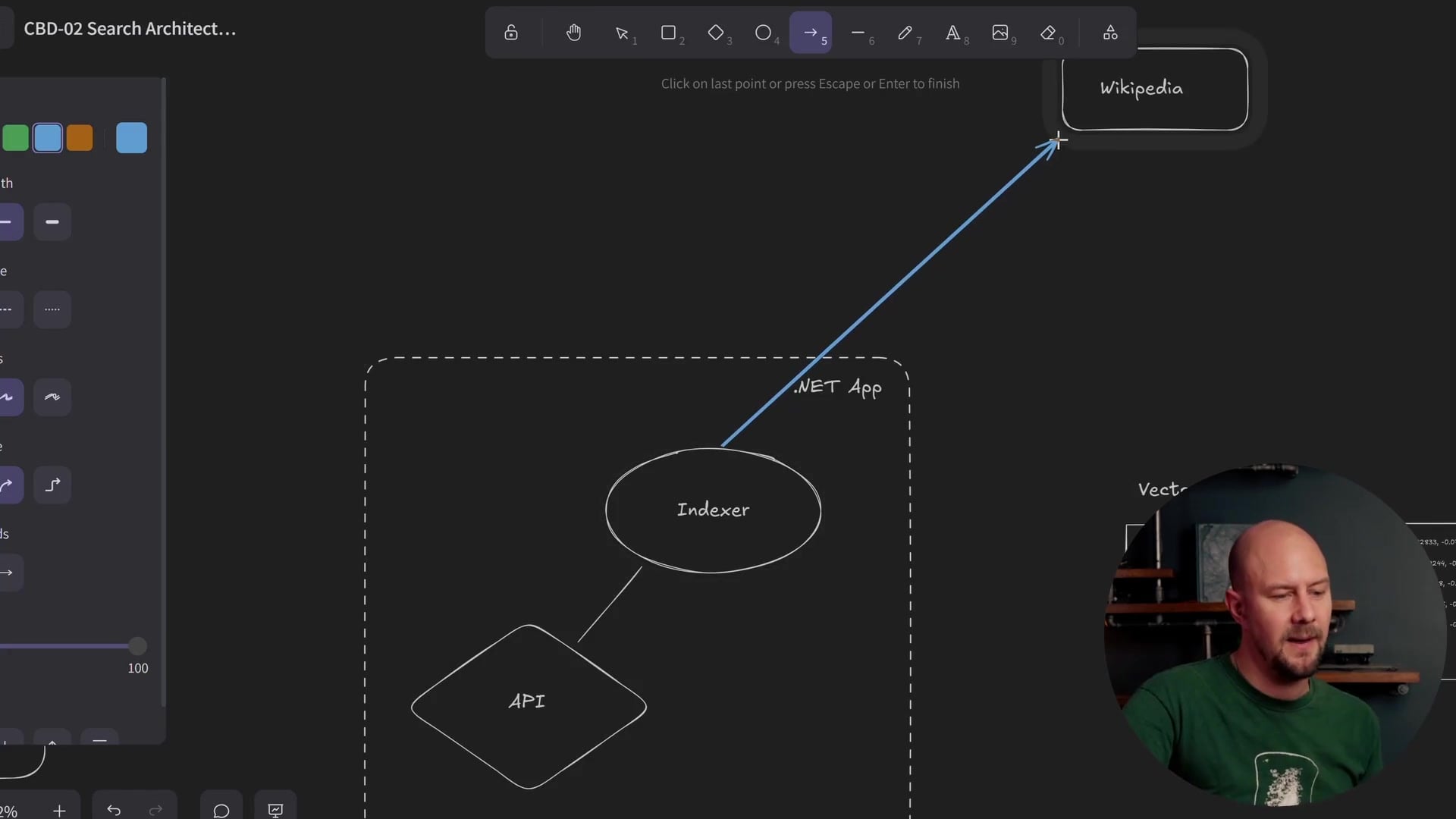
The process works as follows:
- Fetch Data: The indexer iterates through a list of Wikipedia article titles. For each title, it reaches out to the Wikipedia API and pulls down the actual text content of the article. For instance, if the title is "Stonehenge," we retrieve the full text about Stonehenge.
- Create Embeddings: Next, we send that text to the OpenAI embedding model. We are using
text-embedding-3-smallfor this project. This is a hosted model from OpenAI that converts text into a vector embedding (a list of numbers representing the semantic meaning of the text). - Store Data: This is where things get interesting. We split our storage into two separate databases.
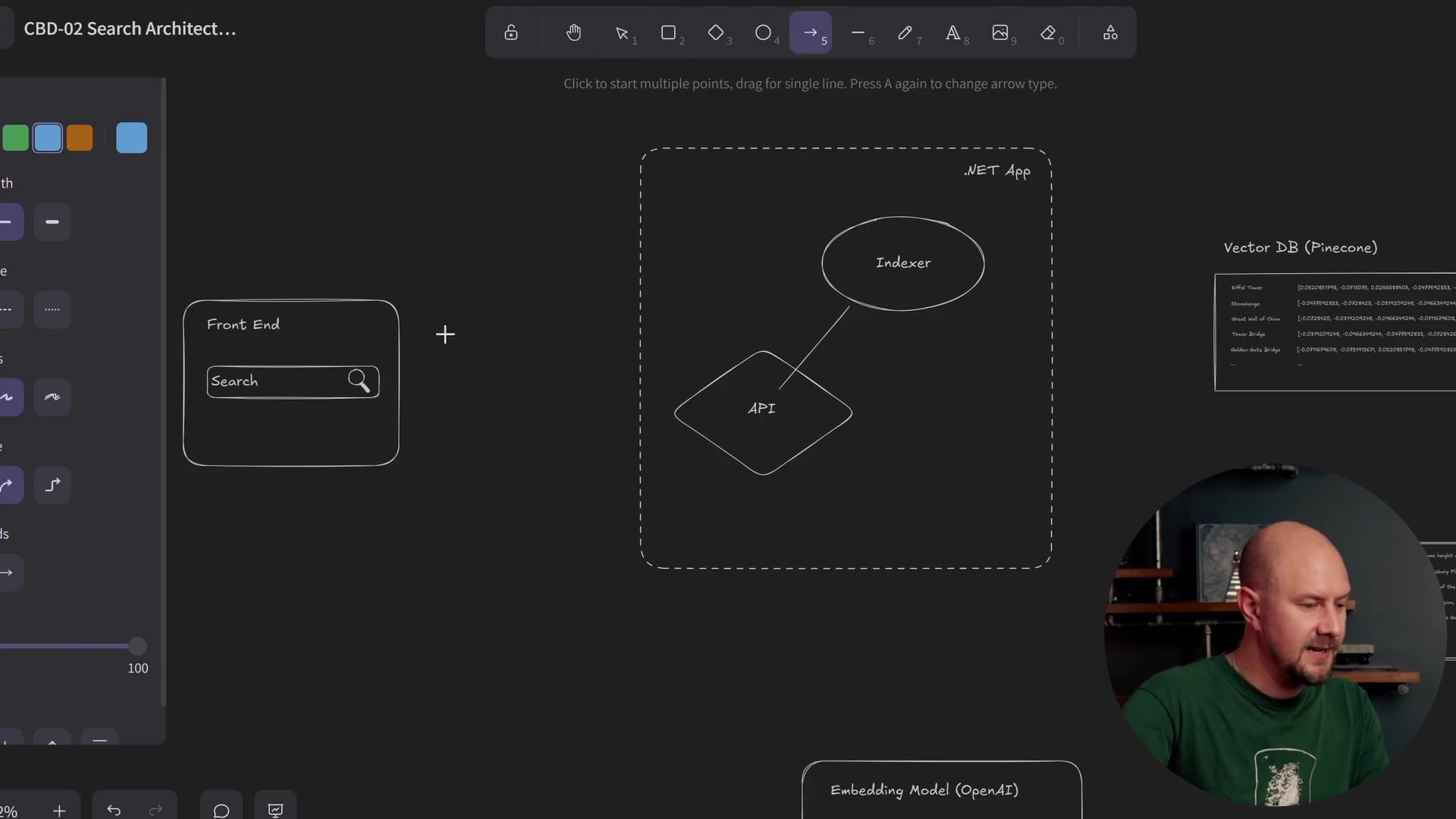
As shown in the architecture diagram above, we store the data in two places:
- Vector Database (Pinecone): We store the vector embeddings here. Pinecone is specialized for storing multi-dimensional vectors and performing cosine similarity matching. It is very fast at finding "mathematically similar" vectors.
- Content Store (SQLite): We store the actual raw text of the Wikipedia article here.
Why use two databases?
Vector databases like Pinecone are incredible at math—specifically matrix operations and vector matching. However, once we have found the matching vector, we need to show the user the actual text. We do not want to go back to the Wikipedia API in real-time to fetch the text again. By linking these two databases using the primary key of the article chunk, we get the best of both worlds: fast vector search and reliable content retrieval.
To implement the embedding logic, we will be leveraging Microsoft.Extensions.AI. This library simplifies the integration and provides excellent diagnostics. It also allows us to easily swap out API providers later if we decide to use a different model than OpenAI.
The Search API
Once the data is indexed, we need a way to search it. This is handled by our API endpoint.
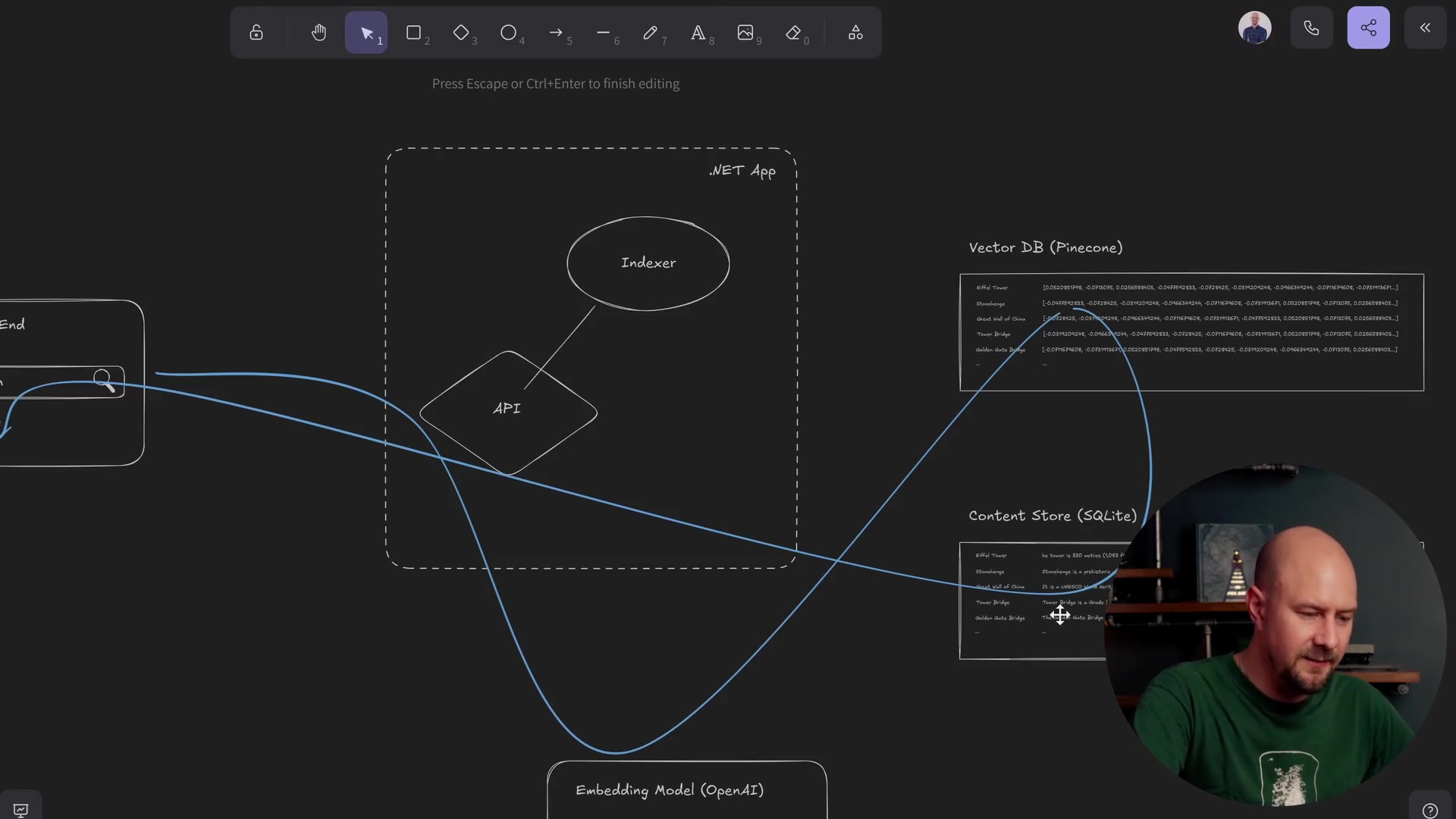
The search flow follows a specific path through our code:
- User Request: The user types a query (e.g., "big bridge in London") into the front end. This triggers an HTTP GET request to our API endpoint, passing the search term as a query string.
- Embed Query: The .NET API takes that raw text query string and sends it to the exact same OpenAI embedding service we used during indexing. We must use the same model (
text-embedding-3-small) so that the resulting vector exists in the same "semantic space" as our indexed articles. - Vector Match: We take the embedding vector returned from OpenAI and send it to Pinecone. We ask Pinecone to find the "top K" records that match this vector.
- Retrieve Content: Pinecone returns the IDs of the most relevant records. Our API then takes those IDs and queries the Content Store (SQLite) to retrieve the actual text associated with them.
- Response: Finally, the API sends this text back to the front end, which displays the list of results to the user.
The "Search Demo" Experience
By the end of this first section, you will have a fully complete MVP (Minimum Viable Product). You will be able to go into the front end and type any semantic query you like.
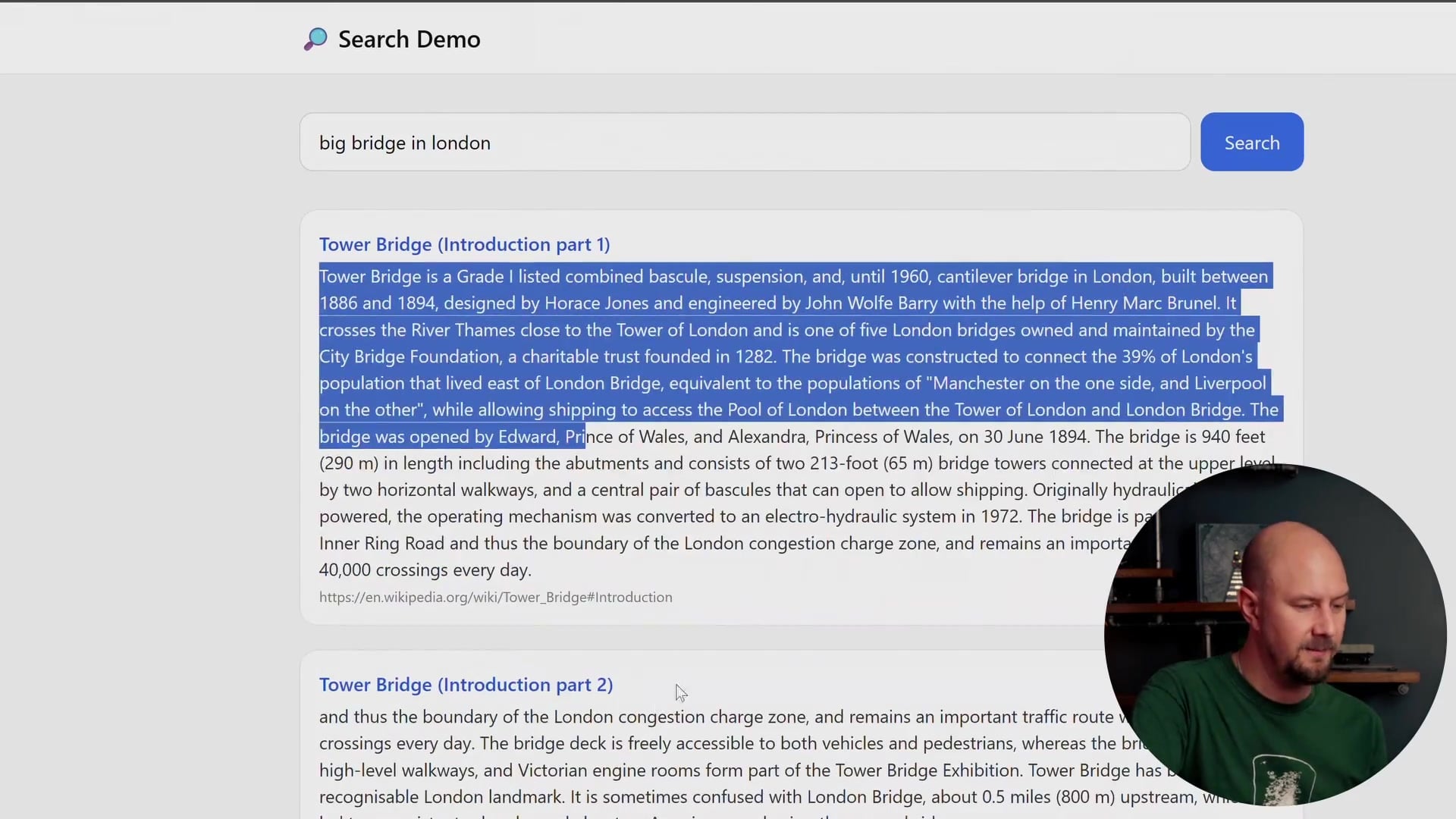
For example, searching for "big bridge in London" will:
- Hit the API.
- Embed the string.
- Match it in the vector database.
- Pull the closest Wikipedia excerpts (Tower Bridge).
- Display the raw text in the UI.
This architecture provides the foundation for everything that follows. Once we have a working semantic search engine, we can start improving it by chunking articles for better granularity, adding RAG for direct question answering, and eventually giving it agency to act as a chatbot.
Recap
We have covered a lot of ground regarding the architecture we are about to build. Here is a summary of the key takeaways:
- Semantic vs. Keyword: We are building a system that understands the meaning of a query (e.g., "stone pyramids") rather than just matching exact words.
- The Indexer: We use a .NET service to fetch Wikipedia content, convert it to vectors using OpenAI, and store it.
- Dual Storage: We use Pinecone for the vectors (math/search) and SQLite for the content (text retrieval) to optimize performance.
- The Search Flow: The user's query undergoes the same embedding process as the data, allowing us to find matches mathematically before retrieving the human-readable text.
In the next step of this project, we will look at the code required to set up the indexing service and start pulling data from Wikipedia.